
Your office may be closed for Thanksgiving and Christmas Holidays, but your customers can still send email, place orders, and submit forms on your website. Before you leave, make sure they know when you will return, what they can still do, and when to expect a response.
You do not need a complicated holiday plan. A few checks of your email and website can help you step away without leaving your customers guessing.
Set your out-of-office replies
An automatic reply that only says “we are closed” leaves your customer with questions. Include the dates you will be away, when you will reopen, and when you will begin reviewing messages. If you will also be closed the Friday after Thanksgiving, say so.
Use this example as a starting point, replacing the bracketed details with your own:
Thank you for contacting [Business Name]. Our office is closed for Thanksgiving from [date] through [date]. We will reopen on [day, date] at [time] and begin reviewing messages when we return.
Thank you for your patience, and happy Thanksgiving.
If your website will continue accepting orders, add a sentence explaining when processing will resume. Only include an urgent contact method if you actually provide assistance during the closure.
Set your reply in KloudEmail webmail
If you use KloudEmail webmail, follow these steps:
- Open the menu next to your email address in the upper-right corner.
- Select Settings.
- Select Incoming Email, then the Auto-Reply tab.
- Set Status to On.
- In the Auto-Reply Message box, enter your holiday reply with your closure dates, reopening date, and when you will begin reviewing messages.
- To have it run only while you are away, check “Enable only during the following time frame” and enter your start and end dates and times.
- Click Save.
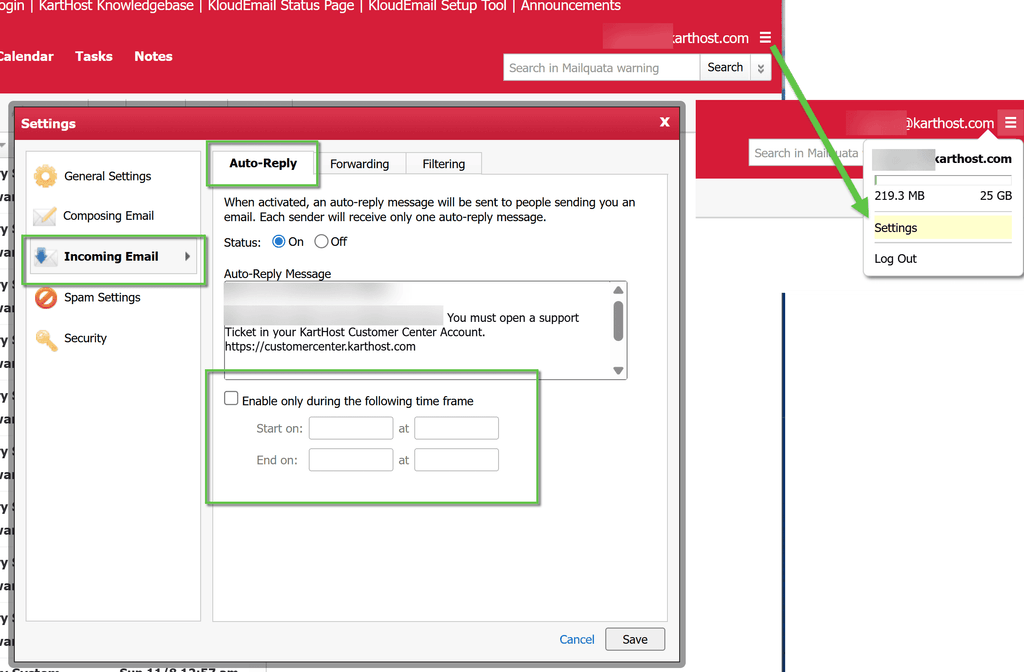
The Auto-Reply screen notes that each sender receives only one automatic reply. Keep that in mind if you test more than once from the same email address.
Decide what needs attention while you are away
You do not have to monitor every inbox during your break. Decide whether any messages genuinely need attention before you return.
- If an inbox needs checking, decide who will check it and when. Make sure that plan matches any response times you have promised.
- If you will not review messages until you reopen, say so in your automatic replies and website notices.
- Confirm that your order notices and contact form submissions go to the right address, even if you will review them after the holiday.
If you hired seasonal help, review any access that is no longer needed. Before retiring an email address, decide where any remaining customer messages should go. See How to Give Seasonal Help Access Without Leaving the Doors Open.
Update your website’s holiday information
Your website should give your customers the same information as your automatic reply. Check each place where you display your hours or promise a response:
- Your contact page, footer, and holiday banner. Show your closed dates and reopening date. If you will keep limited hours, list those instead.
- Your contact form and confirmation message. Remove any same-day response promise that will not apply while you are away.
- Your ordering, booking, or donation pages. Explain any processing delays and when normal service will resume.
Before making changes, confirm that you have a recent website backup. For more on that check, see The Pre-Holiday Website Backup Habit Every Small Business Should Start Now.
If you are also preparing for holiday promotions or extra orders, see How to Make Sure Your Website Can Handle a Busy Fall Week.
Run one final check before you leave
Look at your business the way your customer will. Send an email from an outside account after your automatic reply becomes active, submit your contact form, and check your holiday notice on your phone.
Use this short checklist before you sign off:
- Your automatic reply shows the correct reopening date and explains when you will review messages.
- Your website displays the same holiday schedule.
- Your test form notification arrives in the intended inbox.
- Your order or booking confirmation explains any holiday delay.
- If someone will check messages while you are away, that person knows which inboxes to check and what needs a response.
If you need to check more than your automatic reply, follow A Quick Test to Make Sure Every Staff Mailbox Still Sends and Receives.
You do not have to keep your office open to keep your customers informed. Clear dates, an honest response timeframe, and working email and forms help you leave things in order before you take your break.
